ValiqAI only tests sites you own. You prove it once with a DNS record, and from then on you can scan that domain and every subdomain under it, from the app, the CLI, a schedule or Slack. It takes about two minutes.
Good to know
- One record covers every subdomain. Verify
example.comand you can scanapp.example.com,staging.app.example.comand so on. Ports don't matter. - Domains belong to your account. If teammates scan the same site, each of them verifies it in their own account.
- You can verify up to 20 domains.
Add your domain
In ValiqAI, open Domains and choose Add domain. Enter the bare domain, like example.com: no https://, no path. A leading www. is dropped, since verifying the domain covers it anyway.
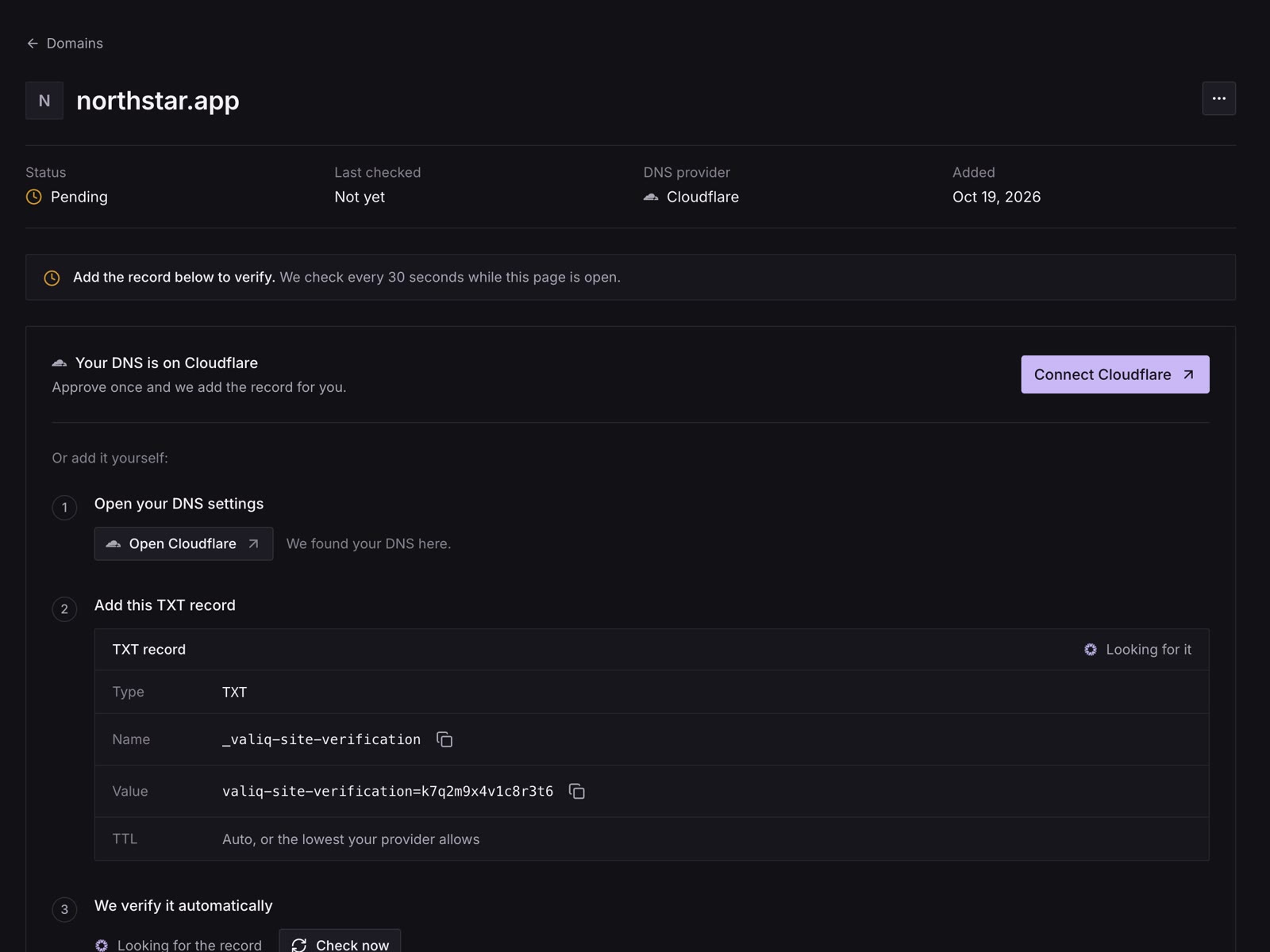
The domain's page then shows two ways to verify it: one click, when your DNS provider supports it, or a TXT record you add yourself.
One-click setup
If your DNS is on a provider that supports Domain Connect (Cloudflare and Glauca today), the page says Your DNS is on Cloudflare with a Connect Cloudflare button. Approve the change at your provider and the record is added for you. ValiqAI checks it a few seconds later and emails you when the domain is verified.
If the connection doesn't finish, nothing is lost: add the record yourself, below.
Add the TXT record yourself
Open your DNS settings
They're where your domain's DNS is managed, usually the company you bought the domain from. When ValiqAI recognises your provider, the domain's page has a button straight to it, like Open GoDaddy.
Add this TXT record
| Field | What to enter |
|---|---|
| Type | TXT |
| Name (or Host) | _valiq-site-verificationMost providers add your domain for you. If yours asks for the full name, use _valiq-site-verification.example.com. |
| Value (or Content) | valiq-site-verification=…Yours is unique to the domain. Copy it from the domain’s page in ValiqAI (Domains › your domain). |
| TTL | Auto, or the lowest your provider allows |
Tip
If the record later shows up as _valiq-site-verification.example.com.example.com, your provider added the domain for you and it was typed again. Change the name to just _valiq-site-verification.
Wait for the check
ValiqAI checks every 30 seconds while the domain's page is open, or you can press Check now. Most records show up within a few minutes. Some DNS providers take longer, up to 48 hours.
Where the fields are at common providers
| Provider | Where to add it | The name goes in |
|---|---|---|
| Cloudflare | DNS › Records › Add record | Name |
| GoDaddy | Domain › DNS › Add New Record | Name |
| Namecheap | Domain List › Manage › Advanced DNS › Add New Record | Host |
| Amazon Route 53 | Hosted zones › your domain › Create record | Record name (put the value in double quotes) |
| Squarespace | Domains › your domain › DNS › Add record | Host |
| Vercel | Domains › your domain › DNS Records | Name |
Check the record yourself
To see what public DNS returns for the record, run this. When it prints your value, ValiqAI will find it at its next check.
$ dig TXT _valiq-site-verification.example.com +short"valiq-site-verification=..."On Windows, use nslookup -type=TXT _valiq-site-verification.example.com instead.
What a verified domain covers
- Every subdomain, at any depth.
example.comcoverswww.example.com,app.example.comandeu.app.example.com. - Any port.
example.com:8443is covered byexample.com. - Just a subdomain, if you prefer. Verifying
staging.example.comcovers it and the subdomains under it, but notexample.comitself.
Some names can't be verified: localhost, and names ending in .local, .internal, .test, .example or .invalid. To scan a build running on your own machine, put it on a public staging address first.
Keeping it verified
Leave the record in place. ValiqAI checks verified domains again every week. If the record is gone:
- The domain shows Record missing, and scans of it pause, including scheduled scans. Schedules are skipped, not deleted.
- You get an email: "Action required: verify example.com again on ValiqAI", or "reconnect" if you used one-click setup.
Add the record back, or press Reconnect Cloudflare on the domain's page, and scans resume.
From the terminal
The CLI does the same, signed in to your personal workspace:
$ valiqai domains add example.com --waitIt prints the TXT record to add, then checks every 30 seconds until the domain verifies. valiqai domains lists your domains, valiqai domains verify example.com checks once, and valiqai domains remove example.com removes one.
Remove a domain
On the domain's page, open the menu and choose Delete domain. Scans of it stop until you add and verify it again. The record at your DNS provider isn't touched, so remove it there too if you want.
Troubleshooting
"Not found yet. DNS changes usually show up within a few minutes."
The record isn't visible in public DNS yet. Check that:
- The name is
_valiq-site-verification(see the tip about providers that add the domain for you). - The value was copied in full, starting
valiq-site-verification=. - You added it where your DNS is actually managed. If your domain's nameservers point to another service (Cloudflare, Vercel, your host), the record goes there, not at the company you bought the domain from.
Then wait a few minutes and press Check now, or check it yourself.
"TXT record not found yet. DNS changes can take 5 min – 48 hours to propagate."
The same as above, from a check ValiqAI ran on its own.
"We couldn't find {domain}. Check the spelling and try again."
The domain doesn't exist in public DNS. Check the spelling, and that the domain is registered and live.
"Private or reserved domains cannot be verified."
The name is localhost or ends in .local, .internal, .test, .example or .invalid. Use a public staging address instead.
"You can verify at most 20 domains."
Delete domains you no longer scan. One verified domain covers all its subdomains, so you may not need separate ones for each environment.
"Please wait {n}s before checking again."
Each domain can be checked once every 30 seconds. Wait, then press Check now.
"Domain not verified. Add "{host}" to your verified domains before scanning."
From the CLI or API: the site you asked to scan isn't covered by a domain verified in the account the API key belongs to. Verify it (or its parent domain) in that account.
"You cancelled the connection. Nothing was changed."
One-click setup was cancelled at your DNS provider. Press Connect again, or add the record yourself.
"{name} supports one-click setup but hasn't enabled ValiqAI yet. Add the TXT record manually for now."
Your provider supports one-click setup but hasn't turned it on for ValiqAI yet. Add the record yourself; it takes a couple of minutes.